
What's the difference between frame and bounds?
Frame and Bounds in UIKit

Another most asked question in iOS interviews is “Tell me the difference between frame and bounds” with a follow-up “What happens when you rotate a view?”. Imagine, you are applying a transformation to a view, what happens in terms of frame and bounds. Are they gonna be change or stay in same values?
Short answer is;
Frame = a view’s location and size using the parent view’s coordinate system. Placing the view on the parent.
Bounds = a view’s location and size using its own coordinate system. Placing the view’s content or subview within itself.
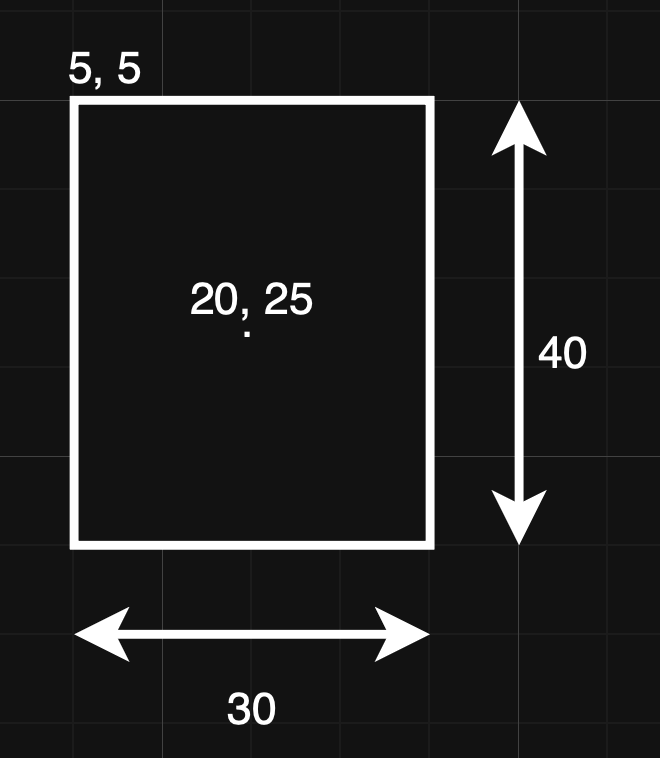
If you think about the view frame in its parent coordinate system when you are rotating, you are changing parent view’s coordinate system. Bounds value will be same and frame value changes. Figure 1.0 shows how it looks like before transformation (rotating) and look carefully to the values.
The values in CGRect(x: 5, y: 5, width: 30, height: 40) define the rectangle's position and size:
x (5): The horizontal distance from the left edge of the parent view to the rectangle’s origin.
y (5): The vertical distance from the top edge of the parent view to the rectangle’s origin.
width (30): The horizontal span of the rectangle.
height (40): The vertical span of the rectangle.
These values specifically define the frame of the view, representing its location and size within its superview (parent) coordinate system.
View:
frame = { 5, 5, 30, 40 }
bounds = { 0, 0, 30, 40 }
center = { 20, 25 }
When the view rotated:
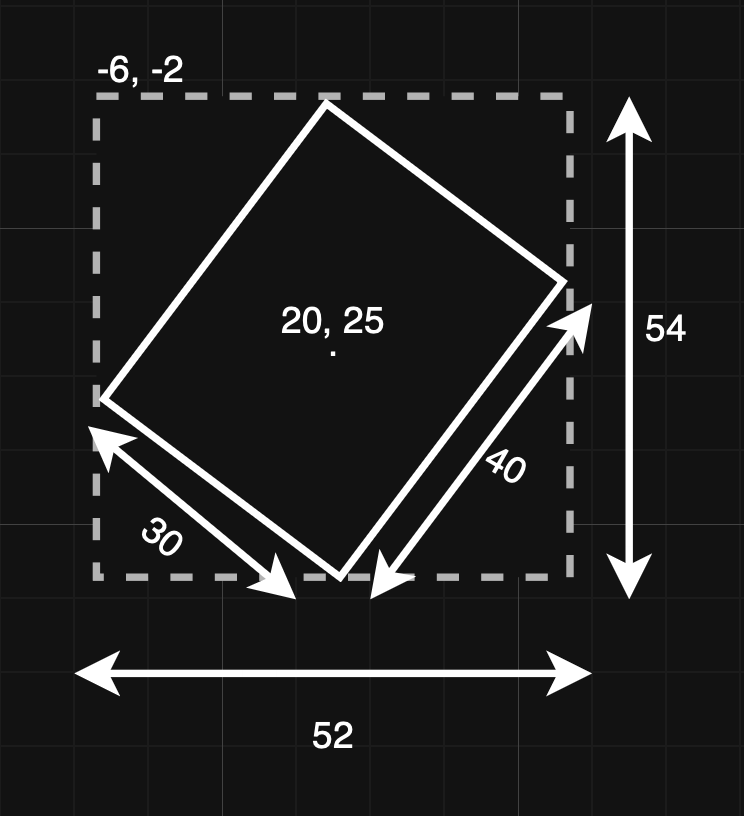
Frame (changed): Because the view is now at an angle, it occupies more “horizontal and vertical space” relative to the parent’s X and Y axes.
Bounds (unchanged): The view’s internal size remains (30 x 40) because the object itself hasn’t grown.
The dashed line in Figure 1.1 shows rotation and parent view’s location. Its width (52) and height (54) are calculated based on the rotated corners of the original (30 x 40) rectangle. Its corners push further out along the X and Y axes. To keep the view contained the parent system must calculate a new bounding box (the dashed line in Figure1.1) that reaches these new outermost points. The distance between its leftmost corner and rightmost corner is now 52, and the distance between its topmost and bottommost corner is 54.
View:
frame = { -6, -2, 52, 54 } // changed
bounds = { 0, 0, 30, 40 } // unchanged
center = { 20, 25 } // unchanged