
Spec Kit (Spec-Driven Development) in an iOS Project
From vibe coding to Spec-Driven Development: shipping a SwiftUI + TCA feature with GitHub Spec Kit inside Cursor

In this post, I wanna tell you something about a paradigm that I didn’t know existed, Spec-Driven Development. Last week, a friend of mine told me there is an open source library called Spec Kit provided by GitHub and at his company they don’t really “prompt” AI anymore. They run it against a spec. I directly dug into it since it is way more automated than the casual vibe-coding and tried to apply it in my toy project.
The main difference between SDD and vibe-coding is vibe-coding excels at rapid prototyping and SDD is essential for complex production systems to prevent AI hallucinations, architectural drift and technical debt. Spec Kit is a workflow that executes scripts and very fine-tuned prompts to produce high quality context for your coding agent and the lightweight framework compared to the other ones. And this is what GitHub says:
Spec-Driven Development flips the script on traditional software development. For decades, code has been king — specifications were just scaffolding we built and discarded once the “real work” of coding began. Spec-Driven Development changes this: specifications become executable, directly generating working implementations rather than just guiding them.
AI-assisted iOS development for me is still typing a prompt in Cursor and pray 🛐 Type a prompt, skim the diff, accept, re-prompt when the tests break.
Spec-Driven Development (SDD) is the pushback. And GitHub’s Spec Kit is the toolkit that makes it usable inside the editor you already have.
This post is a walkthrough of installing Spec Kit into an existing ~40k-line SwiftUI + TCA app Walk Mate and for learning purposes shipping one small feature (Favorites sort + search) end-to-end through the full flow. Every step will be tied to a real file in the repo.
What SDD actually is (and what Spec Kit gives you)
SDD is not write more comments before you code. It is a fixed pipeline:
1. Constitution: the rules of your project
2. Specification: user stories, requirements, success criteria
3. Plan: the technical approach with your chosen stack (SwiftUI + TCA)
4. Tasks: the plan decomposed into buildable phases (spec + plan)
5. Implementation: one phase at a time
Each stage validated before the next.
Spec Kit is GitHub’s implementation of this pipeline. You’ll get:
A CLI specify that scaffolds the artifacts into your project
Markdown .md templates for each stage (constitution, spec, plan, tasks)
Editor-native slash commands so Cursor can drive the flow with a shared vocabulary
The command surface I used in Cursor:
Command | Purpose
/speckit-constitution | Project principles and hard constraints
/speckit-specify | User stories, requirements, success criteria
/speckit-clarify | Structured Q&A to close ambiguity before planning
/speckit-plan | Technical plan with the chosen stack
/speckit-tasks | Decompose the plan into buildable phases
/speckit-analyze | Cross-artifact consistency check
/speckit-implement | Execute one phase at a time
Setup in an existing project
You need three things: uv (Astral’s Python package manager), Python 3.11+, and Cursor. Install the CLI once:
> uv tool install specify-cli --from git+https://github.com/github/spec-kit.gitThen, inside your Xcode project’s root:
> cd MyExistingIOSApp
> specify init . --integration cursor-agent --force
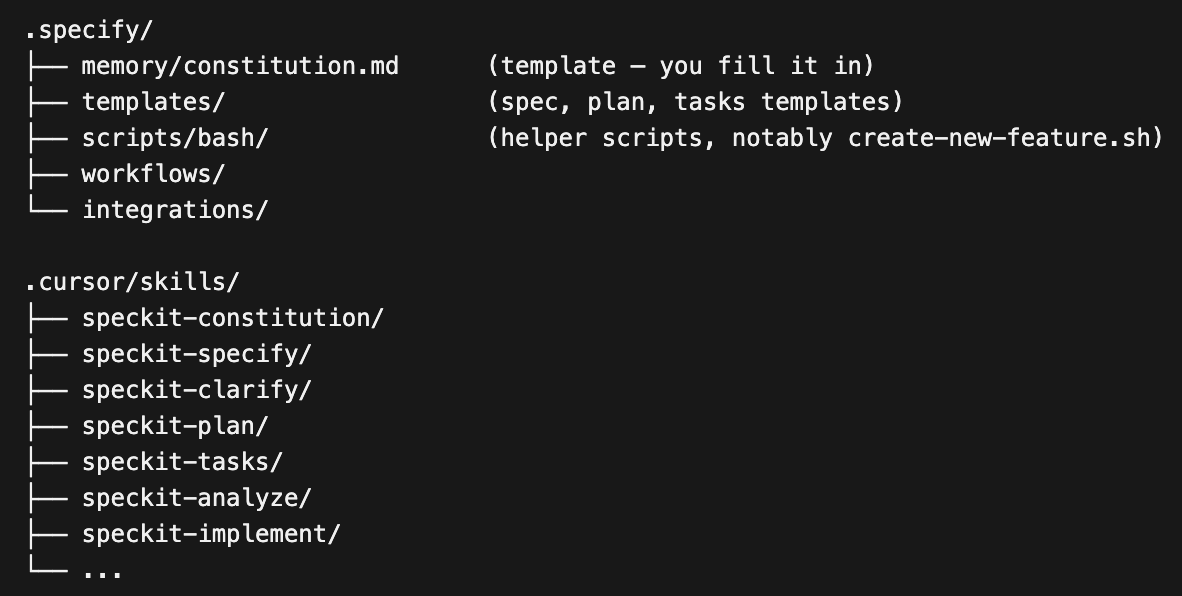
Two things worth calling out here. --force is necessary because the directory isn’t empty Spec Kit merges its templates in rather than wiping. And cursor-agent is the skills-based integration. It installs 10 skills under .cursor/skills/, one per slash command so Cursor’s palette picks them up automatically.
After init, the new tree looks like this:
Two side quests before you move on:
First, gitignore: Spec Kit’s post-install output specifically warns that agent folders can hold credentials and suggests .gitignore -ing .cursor/. I already ignored that folder which means my installed skills are per-clone. For a solo indie app that’s fine. For a team I would commit at least .cursor/skills/ so everyone has the same slash commands. Make it an explicit decision.
Second, Xcode 16+’s file-system-synchronized groups. Any new .swift file dropped into a synchronized folder is auto-added to the target. When /speckit-implement creates FavoritesSortOption.swift, I don’t need to touch project.pbxproj. If you’re on a legacy project with manually managed file references, budget extra time for this friction.
The constitution: fold in what your project already enforces
This is the most crucial section for me because it’s where SDD stops being a novelty and starts paying rent 🤑 This usually set up once at the very start of your project.
In a greenfield app the constitution is aspirational: rules you hope to follow. In an existing app it’s descriptive: rules the codebase already enforces (tribal knowledge, PR comments or Cursor rules files) but in a form no AI agent can read. Writing the constitution is the act of making that knowledge machine-readable for every future agent session.
I ended up with four principles in .specify/memory/constitution.md:
1. SwiftUI + TCA architecture
@Reducer, @ObservableState, delegate actions, @Dependency clients. This is descriptive: FavoriteRoutesFeature.swift already uses @Dependency(\.persistenceClient) and a Delegate enum to talk to its parent. The constitution just names the pattern.
2. Localization completeness
Every user-facing string must exist in all 15 locales (da, de, es, fr, it, ja, ko, nl, pl, pt, ru, sv, tr, zh-Hans, zh-Hant) inside Localizable.xcstrings with ”state”: “translated”. This is a verbatim promotion of .cursor/rules/localization.mdc same rule but now the AI sees it at every SDD step not only when it happens to load that rule file.
3. No magic numbers in UI
Layout, spacing, corner radius, animation timing become named constants under AppConstants.UI, Typography, AppColors or a feature-scoped UIConstants.<Feature> enum.
4. Test-first for reducer logic
Swift Testing + TCA TestStore before or alongside any reducer change.
Driving one real feature through the pipeline
The feature: add user-selectable sorting (by date saved, name, distance) and search to the Favorites list in Walk Mate. Small, self-contained, real. Two production files touched at the start FavoriteRoutesFeature.swift and FavoriteRoutesView.swift.
1. /speckit-specify (define what to build)
This is where we tell the agent what we’d like to build. This step excludes any technical information. It’s purely the business requirements for this feature.
Input verbatim: “Add user-selectable sorting (date, name, distance) and search to the Favorites list.” Spec Kit generated a feature slug (001-favorites-sort-search), scaffolded a directory under specs/, and dropped a filled-out spec.md in it three prioritized user stories (P1 sort, P2 search, plus edge cases), functional requirements FR-001 through FR-010, and measurable success criteria (SC-001: “20 favorites, target route found by name in under 5 seconds”).
The template forced a discipline I keep skipping when I write my own tickets: independently testable user stories, prioritized. If I had just typed “add sort and search” into a normal ticket, sort and search would have shipped bundled. Here they became User Story 1 (P1) and User Story 2 (P2), each with its own acceptance scenarios, either shippable alone.
2. /speckit-clarify (optional follow up questions)
This is the optional action where the agent can look at our requirements and ask any follow-up questions.
Eight questions surfaced. A few of them:
What’s the default sort? (Answer: dateSaved descending, matches current behavior, so users who never touch the menu see no change.)
Does search match name only or also formatted stats like “3.2 km”? (Name only. Matching localized formatted text would be fragile across locales and units.)
How do we sort favorites whose name is empty? (Sort them last when the user picks “Name”, with savedDate as tie-breaker.)
Persist sort selection? Persist search text? (Sort yes, search no.)
3. /speckit-plan (implementation plan)
The planning phase is really cozy. This will create a plan, the data models, the service interfaces and even perform research.
The current view had a private computed property doing the sorting inline which violates Principle I (business logic in views). The plan moved sort and filter into FavoriteRoutesFeature.State.filteredSortedFavorites a computed property on the state. The view goes back to being a thin observer.
private var sortedFavoriteRoutes: [FavoriteRoute] {
    store.favoriteRoutes.sorted { $0.savedDate > $1.savedDate }
}
Notice: the plan step not a code reviewer, caught the constitution violation. That’s the whole point.
The plan ends with a five item constitution-compliance checklist, all green. If any box had been red, the plan would have been the artifact I fixed, not the code.
4. /speckit-tasks (break plan into actionable steps)
It takes the plan and break it up into individual tasks. These are all the individual tasks like the actual code changes to implement this feature.
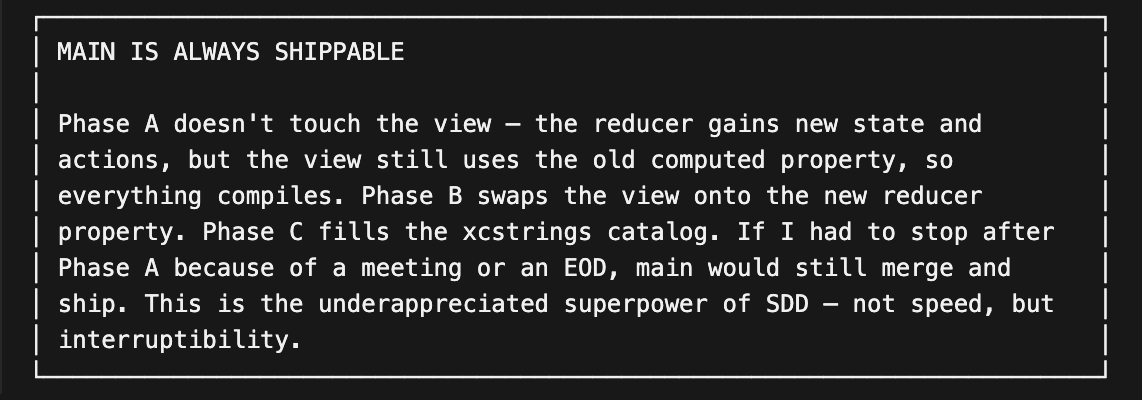
Tasks came out in three phases:
A (reducer + data model + persistence + tests),
B (view with sort menu and .searchable),
C (localization for all 15 locales).
Ordering matters: each phase leaves the project buildable and green.
/speckit-analyze then produced an alignment matrix mapping every FR to a task, a test and a status. That table is now the artifact I’d hand to a reviewer instead of “trust me, it’s covered.” 😬
5. /speckit-analyze (optional validate docs)
Then we have another optional step called analyze. It will simply look at everything that’s been produced before it to make sure that the documentation is complete and we’ve covered everything.
6. /speckit-implement (execute tasks and test)
Then finally, we have the implement step. This is where we tell the coding agent, hey, we have everything we need. Go ahead and implement all of these tasks. We should be able to test our changes in the system and ask the agent to make any adjustments.
Concrete numbers from the run:
Files touched: FavoritesSortOption.swift (new), PersistenceClient.swift, FavoriteRoutesFeature.swift, FavoriteRoutesFeatureTests.swift, FavoriteRoutesView.swift, UIConstants.swift, Shared/L10n.swift, Localizable.xcstrings.
Localization: 5 new keys × 15 locales = 75 xcstrings entries, zero missed locales. This is Principle II operationalized. The AI knew the constitution required 15 locales, so it produced 15.
Tests: 12 in FavoriteRoutesFeatureTests before, 21 after (+9 new). All 88 tests across 10 suites pass.
Compile-break as a feature. Widening PersistenceClient with two new closures broke every test that constructed one. That’s not a bug, it’s the compiler surfacing the exact migration the plan had already enumerated. One edit fixed all callsites. Compiler-enforced migrations are a friend of SDD, they turn “did we get every callsite?” from a grep into a build error.
The view diff is the tweetable moment:
// Before
private var sortedFavoriteRoutes: [FavoriteRoute] {
    store.favoriteRoutes.sorted { $0.savedDate > $1.savedDate }
}
// ...
ForEach(sortedFavoriteRoutes) { favorite in ... }

// After
ForEach(store.filteredSortedFavorites) { favorite in ... }
That’s what “thin view, fat reducer” looks like when it’s enforced by a plan and not by a reviewer’s comment.
What Spec Kit does not solve?
Overhead on tiny changes. Running /speckit-specify to add a SwiftUI #Preview block or fix a typo is absurd. Reserve SDD for changes that touch more than one file or introduce user-visible behavior. Below that bar, just edit the code :)
The constitution is only as good as your enforcement. Nothing in Spec Kit runs tests, greps for magic numbers, or diffs your xcstrings for missing locales. The constitution is a single source of truth the AI reads; enforcement is still your CI, your pre-commit, your reviewer.
Xcode integration is via file system. Spec Kit never touches project.pbxproj. On Xcode 16+ with synchronized groups this is fine. On legacy projects, add friction to your estimate.
Localization can’t be verified without inspecting the catalog. String(localized:) alone doesn’t guarantee entries exist in Localizable.xcstrings. I ran a one-liner to prove it after each phase:
python3 -c "import json; d=json.load(open('.../Localizable.xcstrings')); \
[print(k, len(d['strings'][k]['localizations'])) \
 for k in ['Sort','Name','Date saved','Search favorites','No matching favorites']]"
SDD is a framework for making AI collaboration reviewable: every step produces an artifact you’d be willing to defend in code review and every artifact is validated against a constitution you wrote deliberately. If you’ve been using Cursor like me as a smarter autocomplete, this is the next promotion.
Two pieces I leaned on heavily and would recommend as further reading: Mad Devs on SDD in iOS (https://maddevs.io/writeups/spec-driven-development-in-ios/) for the process wisdom, and Stackademic’s “Death of Vibe Coding” (https://blog.stackademic.com/kiro-ai-for-ios-how-agentic-development-and-spec-driven-swiftui-replace-prompt-coding-091bf760bdbc) for the mindset shift.
Next I want to write about adding /speckit-checklist to CI so the constitution enforces itself in PR review, instead of quietly hoping I’ll remember. If the constitution is the point, that’s the natural next step.
Sources:
Other similar options to Spec Kit; https://specs.md, https://github.com/bmad-code-org/bmad-method
Mad Devs on SDD in iOS - (https://maddevs.io/writeups/spec-driven-development-in-ios/)
Death of Vibe Coding - (https://blog.stackademic.com/kiro-ai-for-ios-how-agentic-development-and-spec-driven-swiftui-replace-prompt-coding-091bf760bdbc)